How it works
When Edge receives a DNS query, it determines the zone to select the appropriate DNS namespace(s) from. It considers the matching destination zone, source IP or network, security policies, and the forwarders’ order of priority.
After determining the zone, Edge selects the appropriate DNS namespace(s) for resolution. Once Edge determines a set of potential forwarders to query, it tries each selected namespace in order, looking for a valid response. If the resolver receives a negative response from a namespace, it will remember the answer and move on to the next namespace, attempting to resolve the query again until it receives a positive response. If all namespaces are exhausted without a positive response, then a negative response is returned to the client.
To leverage Intelligent Forwarding, a namespace is configured with one or more DNS forwarders and can optionally include match and exception domain lists. Each site in Edge has at least one associated namespace, up to a maximum of 10. DNS caches are segmented across namespaces to prevent mixed responses from different resolution paths. Edge can fully optimize query performance and maintain states between a variety of DNS authorities to ensure an optimal client experience.
Namespaces also allow zone overlap. You can add or modify individual records in a zone on an authoritative server without needing all resource records in that zone to be available. Dynamic environments, such as cloud computing, require zone overlap, as different networks may use the same zone but require different responses for subsets of records. Unlike traditional conditional forwarding rules or other resolver solutions, Edge’s forwarding policies provide this flexibility with simple administration and make DNS resource record management easier.
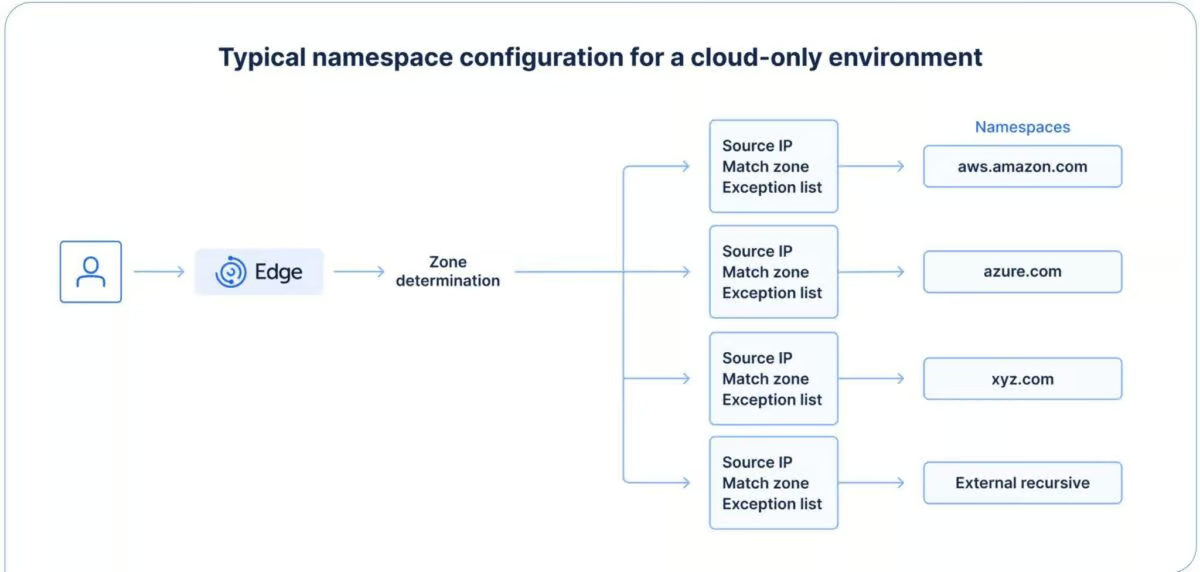
Figure 1. A network environment that has resources in AWS and Azure while having a domain called xyz.com. If none of the queries match, it will forward to an external resolver.
Nine types of use cases
This section outlines nine real-world scenarios that demonstrate the benefits of using Edge Intelligent Forwarding to extend traditional DNS forwarding and gain greater control over resolution across hybrid and distributed environments.
Use case 1: Split-view DNS zones
Enterprises often use different views of the same zone for private and public DNS. This allows the same services, with the same names, to be resolvable both internally and externally. Split view (often called split brain or split horizon) allows each view to be managed separately, as if they were different zones.
However, resource records in the external zone view must also be maintained in the internal view. This leads to errors. Enterprises have tried to solve this by using web proxies to arbitrate service locations. In some environments, an “internal root” overrides the public root zone, fully segmenting these DNS namespaces. The move to Direct Internet Access breaks this, leaving enterprises without a way to resolve split-view records.
Edge intervenes at the DNS level to address split views of DNS zones. Clients can resolve multiple views and use Direct Internet Access for zones outside corporate DNS infrastructure.
How Edge helps: Intelligent Forwarding lets you create two namespaces for xyz.com—one internal and one external. Edge keeps trying to resolve after a negative response to ensure successful resolution. A query destined for xzy.com would have a matching zone indicating it should be queried in both the internal and external xyz.com namespaces, returning the external answer only if no internal answer is found. This removes the need to manage split-view DNS.
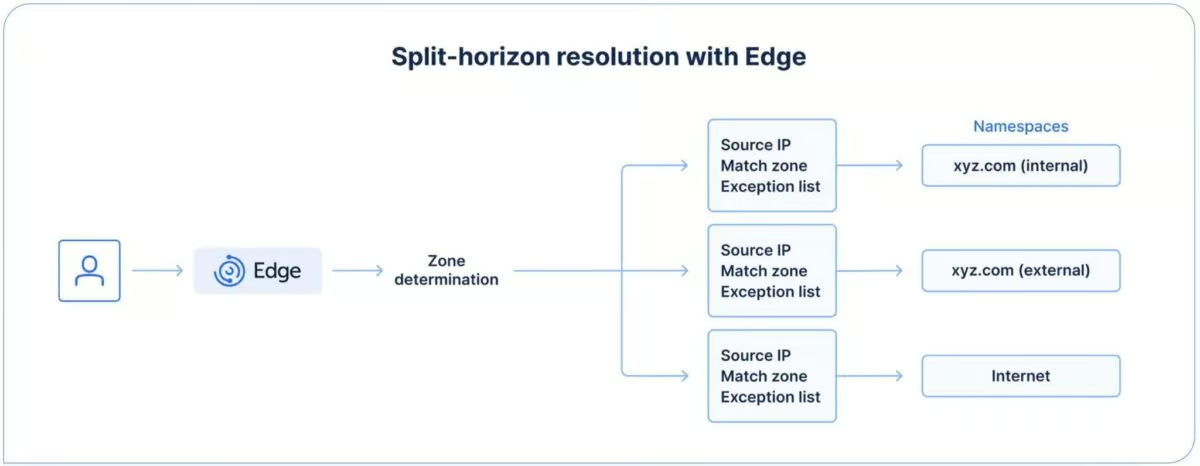
Figure 2: When an environment has the same internal and external domain names, the biggest challenge is often ensuring that the correct resolution path is utilized.
Use case 2: Mitigating outage risks during migration
Most DNS migrations use planned cutover periods to migrate data. A major concern for organizations is the risk of outages during migration. Each migration event (some migrations span upwards of 50 events over several years) carries a risk that missing or misconfigured DNS data in the new environment could cause an outage. Mitigating that risk is critical.
How Edge helps: During migration to Integrity, you can use Intelligent Forwarding to build a resilient DNS infrastructure. This avoids outages caused by missing or misconfigured DNS records. Edge queries the new BlueCat infrastructure first. If there’s a negative response, it then queries the legacy DNS server.
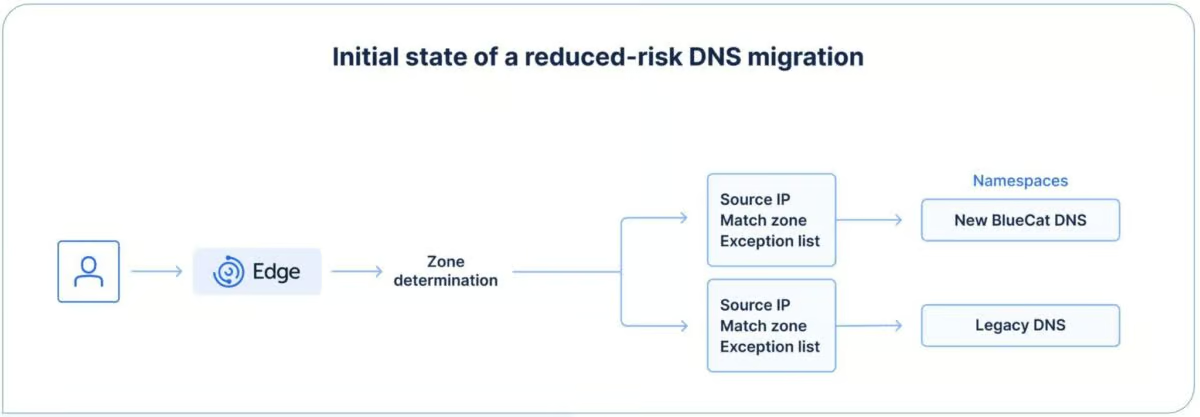
Figure 3: A typical initial state when using Edge with a traditional DNS migration.
Use case 3: Stealth migration for faster completion and reduced outage risk
Migrating DNS with zero downtime is possible. But it can be slow, labor-intensive, risky, and expensive, depending on your infrastructure and tolerance for service disruption. Before most migrations, you must expend significant effort to cleanse existing DNS data to ensure only accurate, relevant records move to the new environment.
With Edge, organizations can migrate from legacy DNS environments to Integrity’s DNS infrastructure programmatically, passively, and efficiently.
During the initial phase of BlueCat’s stealth migration process, Edge is configured to forward DNS queries to the legacy DNS environment. Records returned from the legacy infrastructure are recreated and copied into the new BlueCat DNS infrastructure. Queries that receive a negative response are forwarded to the new BlueCat DNS infrastructure.
After a specified period, the order of the namespaces will be swapped. This makes the new BlueCat infrastructure the primary for DNS queries. Any query that receives a negative response from BlueCat will then be forwarded to the legacy DNS infrastructure. The record for any query resolved by the legacy DNS infrastructure will then be recreated in the new BlueCat DNS infrastructure.
How Edge helps: A stealth migration uses Edge’s query log to migrate data as records are queried. By leveraging namespaces, you can migrate records on the fly, allowing resolution to continue and removing the need for a traditional cutover.
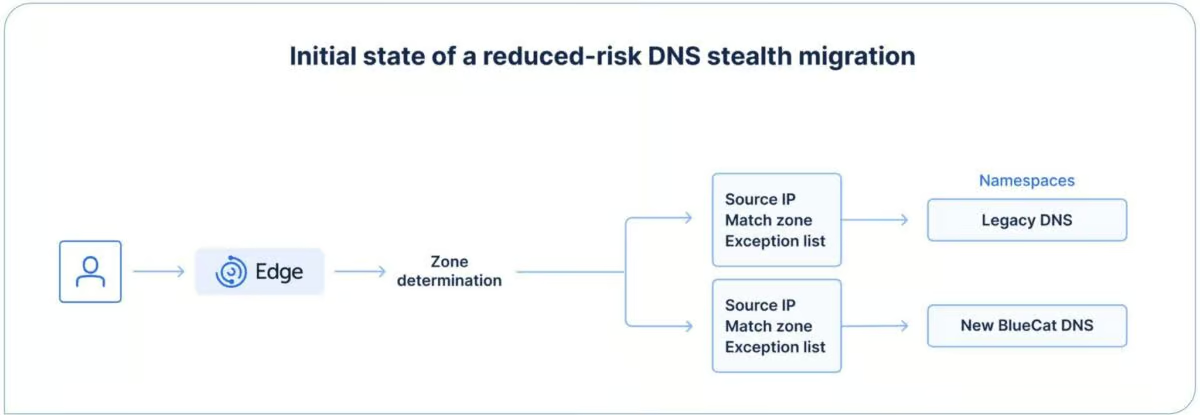
Figure 4: A typical initial state when using Edge with a DNS stealth migration.
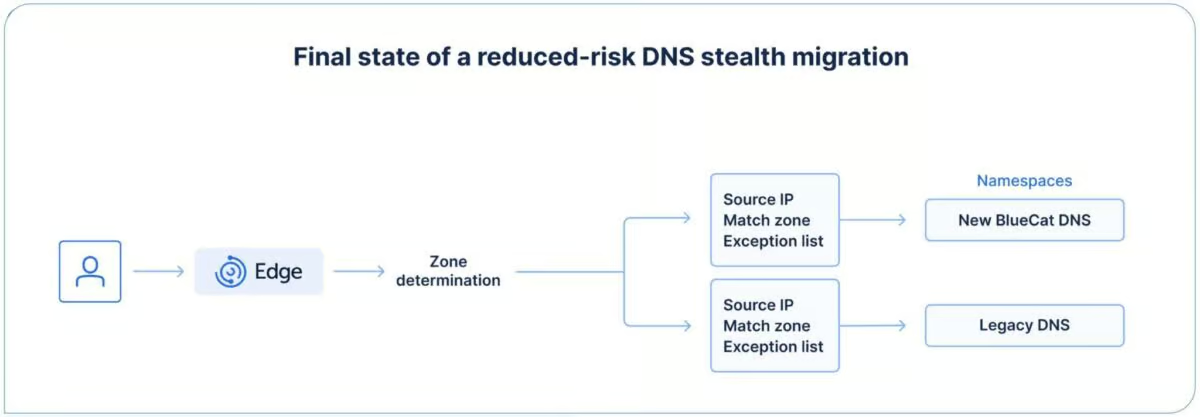
Figure 5: A typical final state when using Edge with a DNS stealth migration.
Use case 4: Network integration via DNS for mergers and acquisitions
Integrating a merger or acquisition into your infrastructure is challenging. Outages or other problems caused by name conflicts, overlapping IP space, or complex forwarding rules often need manual intervention.
Edge lets queries from legacy and acquired networks avoid resolution failures by querying authoritative DNS servers directly. This helps network teams identify and resolve DNS data. Coupled with the previously described stealth migration process, this allows rapid merging of DNS data while retaining a passive, low-risk approach.
How Edge helps: Admins can use domain lists to configure Edge to route client requests to the right DNS server. Edge then uses stealth DNS migration to move only relevant, accurate data between organizations. After the migration, the namespace order is updated to ensure optimal resolution paths.
Use case 5: DNS query route optimization
In traditional hub-and-spoke networks, all non-local traffic is backhauled to a central data center. This often causes DNS query response localization issues and can saturate already highly utilized, expensive WAN circuits.
Edge optimizes your DNS query path. This lets you buy smaller routers than you would need with additional traffic, reducing infrastructure requirements at branch locations and overall WAN spending. An optimized query path also provides hidden benefits, such as reduced latency and unblocked end user access to more localized services.
For example, servers send queries to the store301.xyz.com zone locally, avoiding backhauling traffic to the core data center. Traffic to predefined, trusted external services, such as Office 365, is routed directly to a local external resolver via the branch’s ISP connection. This improves performance, reduces WAN costs, and delivers more localized DNS responses.
How Edge helps: Configuring Edge with domain or zone match lists for a namespace optimizes query routing. This prevents localization issues and reduces excess DNS traffic on WAN links.
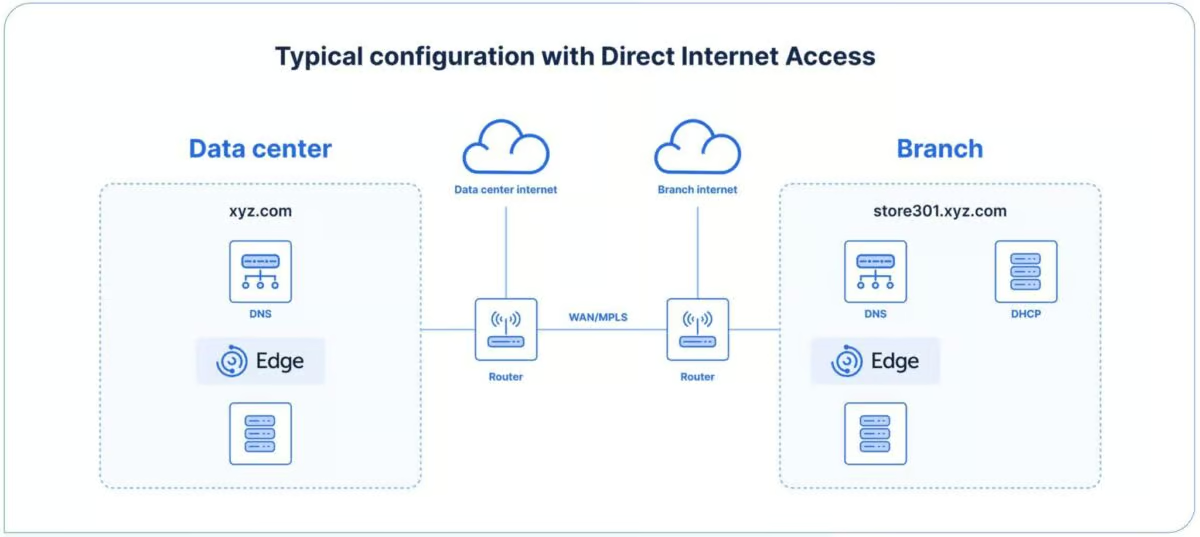
Figure 6: Utilizing Edge to provide local breakout to trusted services while ensuring local resolution occurs properly.
Use case 6: Creating a single source of truth for cloud DNS integration
Cloud-native DNS is usually managed as an isolated component. This prevents a single DNS solution from being the sole source of network truth. To ensure DNS resolution continues to function, hybrid cloud environments introduce
complex forwarding rules, leading to inefficient routing of network traffic over VPN or dedicated network connections. Customers who move to a multicloud solution will also struggle with complex cross-cloud forwarding rules. Moreover, cloud migrations and deployments can lead to DNS resolution and performance issues that are difficult to debug without complete visibility.
With Edge, all cloud-centric DNS traffic is routed to a local DNS resolver, which determines the most appropriate resolver to forward it to. Network teams can manage both cloud and on-premises DNS from a single pane of glass.
Private link services across major clouds often share zones across virtual private clouds (VPCs) or virtual networks (VNets). However, because Edge can resolve across overlapping zones, specific private link records resolve correctly.
All resolution data is available for auditing and debugging. Each query’s source is tracked, and you have full visibility into latency and other performance data.
Cloud computing is usually broken down into segmented services with predictable DNS usage. This provides ample opportunity to segment DNS with policies for accessing remote services or to reduce the risk of systems being exploited to use DNS for command-and-control.
How Edge helps: With Edge, you can configure namespaces in one of two ways. First, you can use a domain list that includes the appropriate domain name for your cloud provider. The second method is to configure namespaces in a priority order that first looks for intra-VPC or intra-VNet traffic, then for shared services VPCs or VNets, and finally for on-premises DNS.
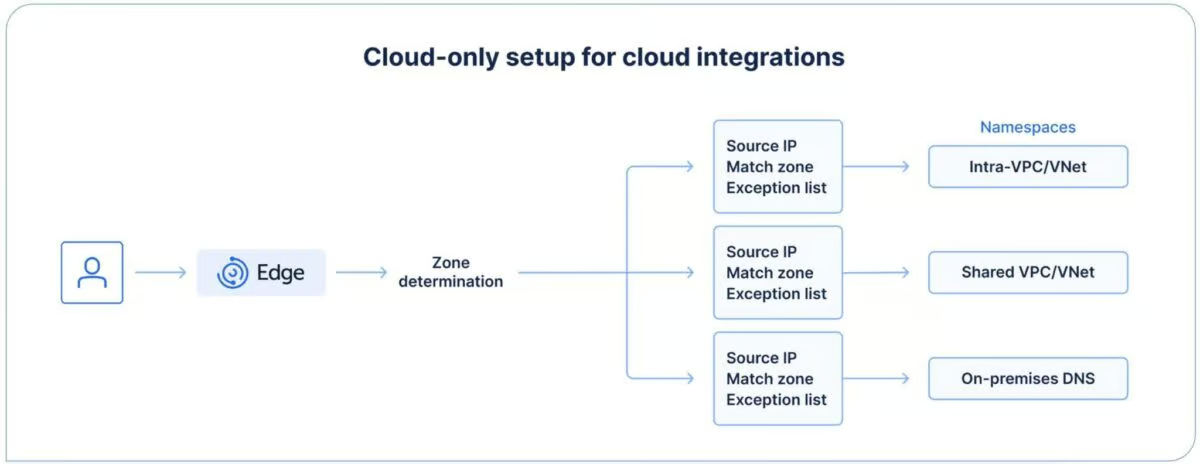
Figure 7: A typical cloud integration configuration. Queries go into the VPC or VNet, then to a shared services VPC or VNet, then to on-premises DNS.
Use case 7: Proxy bypass and Direct Internet Access
Proxy servers are typically centrally located in core data centers to optimize costs. Thus, internet-bound traffic is forced to route through central locations, which can often lead to inaccurate service localization, high latency, and poor user experience. The centralization of proxy servers further complicates local internet breakouts at remote and branch offices.
With Edge, you can ensure clients resolve all queries, both internal and external, enable local breakout for Direct Internet Access to trusted services, and maintain the control and oversight required by security teams.
How Edge helps: With Edge namespaces, you can configure DNS traffic to query an internal or external resolver or an internet-based resolver based on the targeted domain name. Edge is also deployed in remote or branch offices to provide for local breakout.
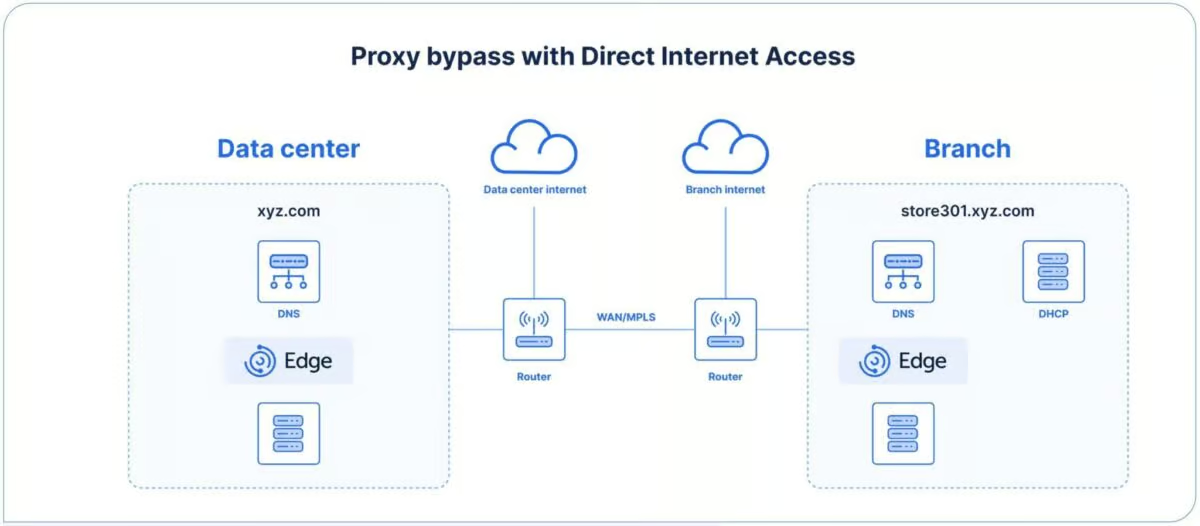
Figure 8: A typical configuration for proxy bypass with Direct Internet Access from a remote branch.
Use case 8: Securing IoT devices
Infrequent updates and/or a lack of security patches for Internet of Things (IoT) devices make them vulnerable to cyberattacks. While IoT devices are largely serviced like any other node on the network, their nature often leads to insufficient monitoring of their activity. This, combined with the fact that many have unfettered access to DNS data, makes them a lucrative target for bad actors.
With Edge, you can restrict DNS access for IoT devices to specific pre-approved records and apply security policies to them even when traditional controls, such as security agents, may not be available.
How Edge helps: With Edge, you can implement specific DNS configurations and security policies to centrally manage IoT devices. DNS policies are applied to permit access only to predefined internal and external services. Using namespaces, you can also specify which devices the IoT devices are permitted to query.
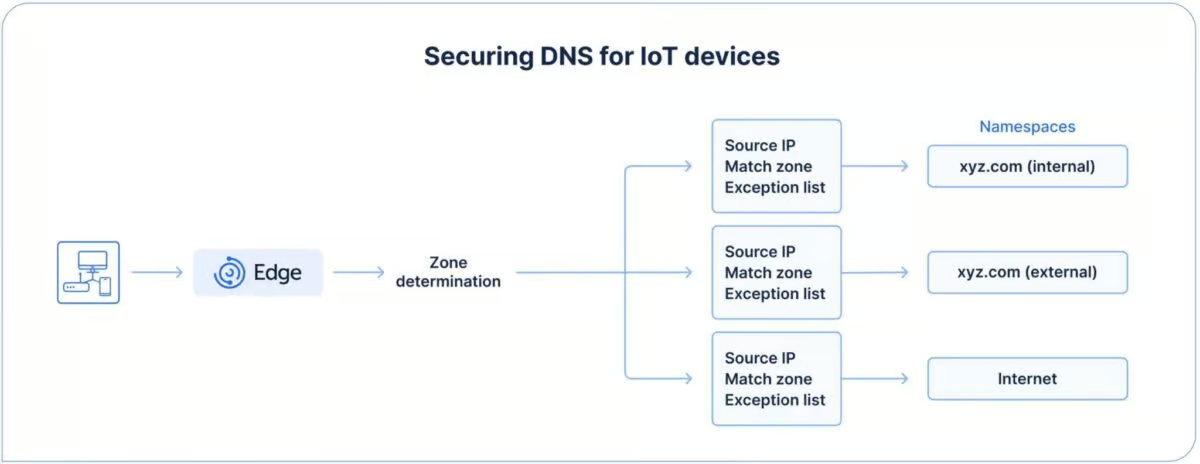
Figure 9: IoT devices are only permitted to use certain secure DNS servers. Everything else is blocked.
Use case 9: Augment Cisco Secure Access with visibility into IP query sources
Cisco Secure Access provides cloud-based resolvers to identify and block queries associated with specific threats. One of the drawbacks to this solution is that all the DNS requests must recurse through internal DNS servers before reaching the Cisco Secure Access external recursive system. Because of this, Cisco Secure Access loses the client’s source IP address for the queries, leading to blind spots on the internal network.
How Edge helps: BlueCat exclusively partners with Cisco Secure Access for external-facing DNS threat protection. Edge forwards external DNS queries directly to Cisco Secure Access for filtering while preserving the client source IP using EDNS Client Subnet. When identity service is enabled, queries are enriched with user identity information from the organization’s identity provider, allowing Cisco Secure Access admins to see and act on both the source IP and the user ID for every query, improving visibility and policy enforcement.
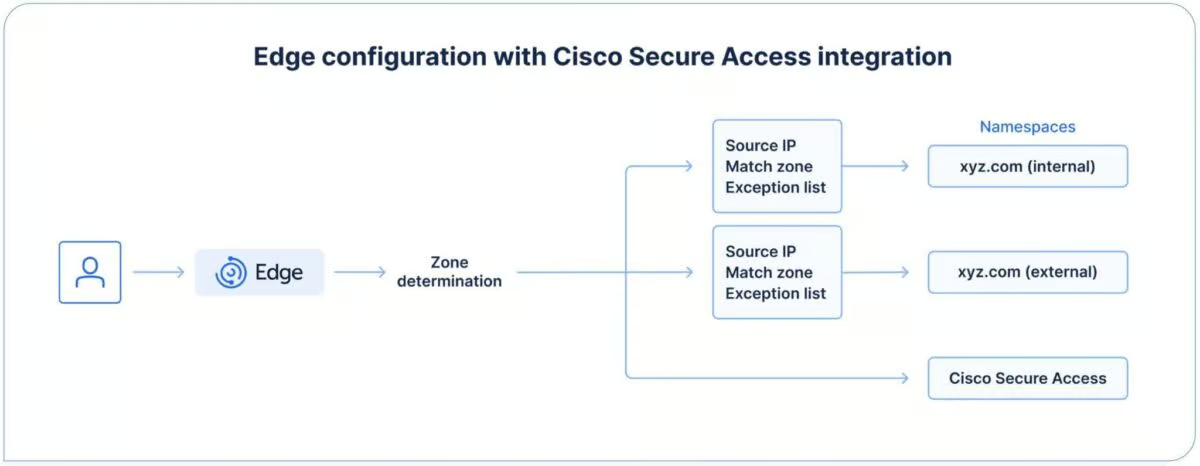
Figure 10: A configuration used when having the same domain internally and externally. If the query is destined for the internet, it is forwarded to Cisco Secure Access.
About Author